
Introduction
With the decline of serial and parallel ports from modern computers, electronics hobbyists are turning more to utilizing USB (or stick with old computers for their legacy ports). Unfortunately, unlike serial and parallel ports, USB is far from simple and so it can be daunting to try to develop hardware and software for it. However, there are many hardware and software solutions that make developing USB device much simpler.
Some PIC microcontrollers now come with a USB Serial Interface Engine (SIE) that handles the very low level parts of the interface. However, writing firmware to work with the SIE can still be a difficult task. Luckily, many PIC compilers come with USB libraries that work out of the box and are dead easy to use. The code generated by these compilers tends to produce a USB Human Interface Device (HID) as these devices do not require custom drivers to be written because Windows has them preinstalled. However, you still need to write your own PC software to read and write data from your USB device. This article shows you how to do this.
Visual Basic Template
The Visual Basic template, which you can download at the bottom of the page, generates the basic code framework that is needed to interface with your USB device. All you need to do is set the VID, PID and buffer sizes going into and out from the PC. After that you’re ready to read and write data.
To give credit where credit is due, I did not write the code that is in the template – the code is based on the code generated by the EasyHID application from Mecanique and modified for Visual Basic 2005 by Steve Monfette. I modified his code a little, wrote some documentation and packaged it into a VB template.
mcHID.dll on 64-bit Windows
mcHID.dll is a 32-bit DLL and so can only be linked with 32-bit applications. Since all 64-bit versions of Windows come with the WOW64 emulator to run 32-bit applications, mcHID.dll will work on a 64-bit operating system but only if your application is compiled as 32-bit/x86. If you receive runtime errors such as “An attempt was made to load a program with an incorrect format” or similar messages, then make sure that you are not compiling your program to the “x64” or “Any CPU” configurations. “Any CPU” configures your program so that it runs as a native 32-bit application on 32-bit Windows and runs as a native 64-bit application on 64-bit Windows. This means that the same executable compiled using “Any CPU” will work fine with mcHID.dll on 32-bit Windows, but will fail on 64-bit Windows. Make sure to compile using the x86 configuration.
Installing
Installing the template is simple. Download and extract the archive and you will find two files: USBTemplate.zip and mcHID.dll. Copy USBTemplate.zip (copy the actual zip file – do not extract it) to your My Documents\Visual Studio [2005/2008/2010/etc]\Templates\ProjectTemplates.
Once a new project has been created (see below), mcHID.dll needs to be added to the Visual Basic project via the Solution Explorer. Once added, change its Copy to Output Directory property to either Copy always or Copy if newer. This ensures that when the project is built, Visual Studio will copy mcHID.dll to the output directory that contains your executable.
The template has been tested to work with Visual Studio versions from 2005 all the way to 2017.
Using the Template
After installation, load up Visual Basic and create a new project. When the New Project dialog opens, you should see the USBTemplate option at the bottom.
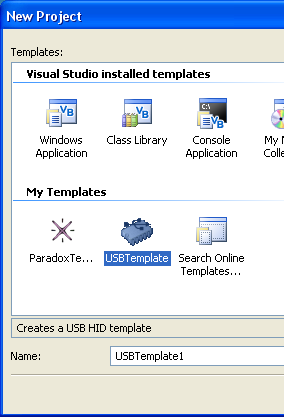
Select it, give your project a name and then click on OK. Visual Basic creates the basic code framework for you.
The following files are created and can be found in the Solution Explorer:
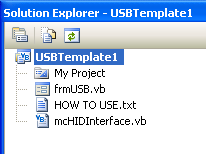
- frmUSB: This is the main form where USB communication takes place.
- mcHIDInterface: Contains the underlying code.
- HOT TO USE: Contains instructions on how to use the template.
The only file which you need to modify is frmUSB.
.NET Version
The default .NET version in template is .NET 2.0. However, the template does work with newer .NET versions and has been tested using .NET 4.6. You can change the .NET version by right-clicking on the project in the Solution Explorer, clicking on Properties and then in the Application tab, change the Target Framework to the desired version.
Updates
2011/03/06: Modified the declaration of the PID and VID in the main form from Short to Integer (Thanks for Fred Schader).
2020/05/05: Updated the .vstemplate file to allow the template to be used in newer versions of Visual Studio.
Download
The template and the DLL file can be downloaded below:


I believe that there is an error in the code. The product ID is specified as a short but it will not take a product ID higher than 32767. I recently got a PID from Micrichip that was in the 64k range and to get the program to work had to declare the PID as an integer. Not sure if this also applies to the VID.
Thanks for the help getting this to run on W7 with the x86 vs any CPU comment
Hi Fred,
Thanks for pointing that out. Yes, there is indeed a problem with the code. The PID and VIDs are both 16-bit values, hence the use of Short for the variable declaration. However, because Short is a signed 16-bit value, its range is 32767 to -32768. Changing it to UShort or Integer (as you have done) solves the problem.
I will update the template with the corrected code.
I can’t get this to communicate.
I have set VendorID, ProductID and buffers correctly. When I check it alwasys returns a handle of “0”. I am trying to connect to a Pic 18F4550. I can talk to it through the Hid terminal that comes with MikroE development environment. I have your template running in Visual Studio 2005. It runs without error but it doesn’t communicate.
Thank you in advance for your comments.
Mike
Hi Mike,
Are you still having problems? If so, can you get in touch using my contact page?
Thanks
Just started using this template, a great resource! In my application, I will be tracking up to 10 identical HID devices plugged into a USB hub. I don’t mind tinkering with the code, but would appreciate any advice you can share or gotchas to avoid.
Thanks
-john
Hi John,
Sorry for not getting back to you earlier. It is possible to use the template to talk to multiple identical devices.
At the moment, the code assumes that there is only one device. In any function calls that require a device handle (e.g. hidWrite, hidSetReadNotify) the code simply retrieves the handle by calling hidGetHandle. This will always retrieve the handle of the first device with a matching VID and PID. If you have a look at the OnChanged function in frmUSB, you will see that the hidSetReadNotify function uses the handle returned by hidGetHandle, which means that the OnRead event will only get called when data is received from the first device you plugged in.
In order to modify the code to allow you to communicate to multiple devices, modify the OnPlugged function to add the matching handle to an array or list somewhere in your code. Do the same for the OnUnplugged function but remove the matching handle from your array. That way, your array will always contain a list of the handles of the currently plugged in devices. For example, declare a list at the top of your form somewhere:
Dim USBHandles As New List(Of Integer)Now modify the OnPlugged and OnUnplugged functions as follows:
Public Sub OnPlugged(ByVal pHandle As Integer)If hidGetVendorID(pHandle) = VendorID And hidGetProductID(pHandle) = ProductID Then
' ** YOUR CODE HERE **
USBHandles.Add(pHandle)
End If
End Sub
Public Sub OnUnplugged(ByVal pHandle As Integer)
If hidGetVendorID(pHandle) = VendorID And hidGetProductID(pHandle) = ProductID Then
hidSetReadNotify(pHandle, False)
' ** YOUR CODE HERE **
USBHandles.Remove(pHandle)
End If
End Sub
Finally, modify the OnChanged function to enable read notifications for all your plugged in devices:
Public Sub OnChanged()For Each pHandle As Integer In USBHandles
hidSetReadNotify(pHandle, True)
Next
End Sub
You should now be able to send data to your devices individually by using hidWrite (not hidWriteEx). When your devices respond with data, OnRead will be called.
I will be modifying the USB Template to incorporate these changes as this makes it much more generic and useful.
I am having trouble sending data from PC to the PIC.
I use ‘hidWrite(VendorID, ProductID, BufferOut(0))’ but the VB program hangs. (stops working)
Passing data from Pic to VB works OK.
Any ideas would be appreciated.
Thank you
-Robert
PS: Could not find ‘hidWrite’ routine in the template.
Are you still having problems? Can you get in touch using the Contact page? I’d like to have a look at your code.
Regarding hidWrite, the function is available in the template and does indeed work – you can get the handle of the device from the OnPlugged routine.
Thanks Amr. Actually, your timing was great as your response confirmed the solution I had cobbled together.
Due to the number of devices (6), I created a class for the device, placed the buffers and DataIn in that class as well as the pHandle, Serial and related stuff, and created a list to add and remove the elements with plug and unplug respectively. That way I don’t mix up data streams when interrupts come in. I had also modified away from the ‘Ex’ versions of the calls, which works as advertised.
My thinking ran that, as long as I had separate datain and buffers, I should not have collisions when multiple devices were responding during a multi-part message – I would just route the data to the data in and buffer for the class instance and it should work.
I did find that I needed to use a timer running a polling routine so I can hear from more than just the head of the pack. It works great as long as all of the devices are connected before I start the application and I don’t remove one until I shut down. For some reason notification gets lost for the device next to the port that has a plug or unplug event. I’ve not sure if the handles are subject to change at this time.
Is it possible for the pHandle for a connected device to change when another is disconnected?
I also note that my devices are dual registered (Windows XP). One set of handles has the serial number, the other the long integer Handle assigned by the system. Is there a way to access the serial number based handle, or do we need a different DLL for this? Alternately, can you help me decode the text and length requirements of the hidGetSerialNumber method?
Thanks again for your support. Great to have this resource available?
-john
Hi John,
Glad to hear that you’re making progress. I’ve done some more testing and what I’ve found is that every time you plug in or unplug a device, the OnChanged event gets called and the read notifications for all devices get removed. If you use hidGetItemCount and hidGetItem functions to list all of the HID handles you will find that they will completely change everytime a device is plugged or unplugged. If you modify the OnChanged function to scan through the list of new handles, identify the ones that match your VID and PID (remove the code that does that from OnPlugged) and reenable their read notifications, then you will continue to get read interrupts for all your devices.
Assuming that everything described above is working as it should, then it’s obvious that you can’t use the handles as unique identifiers. It certainly seems possible to use serial numbers if you can modify your descriptor to add one in (I’m looking into that).
Oops – wrong keyboard – the ? should have been a !!
I have a bit of an update. It appears that, though I can see the new HID handle, set its readnotify to true and test that it is indeed true, I can’t get the interface to pass data from it.
I have found a workaround, though. In the event of an unplug, I clear all of my buffers, clear my device list, then disconnect from HID, followed by a reconnect. The reconnect triggers the Plugged routine which populates my screen and seems to find all of the new handles.
Now, this might pose problems for a history log, but I think I can deal with that by simply referencing the history log in a csv file by serial number.
Does this approach raise any flags with you?
Hi John,
I too have experienced the same behaviour as you: if you clear your list of handles and repopulate it with new ones you can continue to communicate with your devices. I’m currently looking into adding a serial number to the descriptor in mikroC so that I can continue to identify my devices when the handles change.
First off, thank you to Amr for giving me a starting point! I’m trying to implement a quiz bowl lockout system on the cheap. I have 10 identical USB keypads and I need to identify which keypad is pressed first.
JOHN, is there any chance this is what you were trying to accomplish? If so, do you have a project you might be willing to share? You can find my contact information on my web site, which is linked to my name.
Thanks,
Matthew
Hi,
I have the same problem of Robert Lowe (message 4.)
I can’t write on my PIC from the VB interface…
What’s the solution ?
Thanks
Could you get in touch through my contact page? I’d like to have a look at your code.
Hi,
in case of n. 1 Hid with different endpoint
-Endpoint 81, in 1
-Endpoint 01, out 1
-Endpoint 82, in 2
-Endpoint 02, out 2
-Endpoint 83, in 3
-Endpoint 03, in 3
WHAT TO DO ????
What’s the solution?
Thanks
I don’t really understand your comment. Could you try explaining it again?
Sorry if I talk about something elsr, but, referring to reply n. 3 (multiply hid): Every hid can have different endpoints. Every endpoints can transmit packets of different bites. Usually with mcHID.dll you can read and write only one endpoint. The question is: if you have more endpoints, how should you modify mcHID.dll in order to manage all of them? Many greetings, thanks a lot! Luis
Hi Luis,
HID devices with multiple endpoints are not something that I have worked with previously. Looking through the list of functions in mcHID.dll, there does not appear to be any way of specifying which endpoint to communicate with.
However, If you have a look at the Visual Basic code for reading and writing, you will notice that the first byte of the read and write buffers is always 0 (report ID). Perhaps changing this number could allow you to communicate with multiple endpoints, with the number specifying the endpoint number?
Hi Amr,
I noticed the “report ID always set to 0”.
If Report ID 0 is not sent, the transmission is not performed.
Using a USB sniffer, the microcontroller sets correctly the following endpoints:
– Endpoint-81, in 1
– Endpoint-01, out1
– Endpoint-82, in 2
– Endpoint-02, out2
– Endpoint-83, in 3
– Endpoint-03, out3
81,01,82,02,83,03 are the addresses.
I just have to do some testing and I will tell you the result.
Thanks
Luis
hi,
…unfortunately are not able to work with different endpoint….
Luis
Dear Amr,
I am trying to use your template and am having problems. I seem to be able to connect ok. I am getting OnChanged events and OnPlugged events. However, I can’t seem to be able to write to the device.
When I execute “hidWriteEx(VendorID, ProductID, BufferOut(0))” and use a USB device monitor, I see nothing happen. When I execute “hidWriteEx(VendorID, ProductID, BufferOut(1))”, I see some activity, but not enough – I see 2 bytes go out, not the 3 I had thought I was passing. Also, I don’t get a response (probably because not enough is being passed out…)
So I have a few pointed questions beyond “help”.
1) How do I determine the correct value for BufferOutSize? Is it the number of bytes I am sending + 1? (ie. I need to send the device “C0 03 12”).
2) How do I determine the BufferInSize? Is this based on the expected response from the device?
3) Do I need to interate through the BufferOut array?
Thanks
Kevin
Hi Kevin,
– 1&2: The size of the buffers transferring data in and out of the PC are fixed and should match the sizes of the IN and OUT buffers of your USB device, as determined by the device’s descriptor.
– 3: I’m not really sure what you mean. You will probably need to iterate through it to fill it with data, but then you just need a single call to hidWriteEx to transmit the buffer contents.
What is your USB device? Did you develop it yourself or are you using an existing HID device?
Amr
Amr,
Thanks for the response. I am trying to work with a USB/HID RFID reader. I have the API manual for the reader, so know what to send and what to expect back… My code at present (to send soemthing) is:
BufferInSize = 64
BufferOutSize = 3
ReDim BufferIn(BufferInSize)
ReDim BufferOut(BufferOutSize)
BufferOut(0) = 0
BufferOut(1) = CByte(Convert.ToInt32(“31”, 16))
BufferOut(2) = CByte(Convert.ToInt32(“03”, 16))
BufferOut(3) = CByte(Convert.ToInt32(“01”, 16))
hidWriteEx(VendorID, ProductID, BufferOut(0))
When I do the above, nothing happens (I am using the “Device Monitoring Studio” to watch comms between the device and the computer.
If I change the hidWriteEX index from 0 to 1, I see the 2nd and 3rd bytes of data go out, but not the 1st.
By putting in a message box at the end of the code, I can show that the “stall” is occuring at the hidwriteex code, because I never get the message box to show.
Thanks
Kevin
Oh, and it is a purchased device, I am using and when I say hidwrite index, I am referring to the index number of “BufferOut” in the hidWriteEX function.
Kevin
Hi Kevin,
Hmm…I’m wondering if the configuration of your RFID reader might not be compatible with mchid.dll. Can you give me the specific part number of this reader? I’d like to have a quick skim through the datasheet myself.
Also, there should be no need to ReDim the buffer arrays – simply set the constants at the top of From1.vb to the sizes of your buffers, although there should be nothing wrong with what you’ve done above.
Amr
The unit is called the RFID Me ( http://www.mti.com.tw/rfidme/). If you send me an email to autoid@ohio.edu, I van send you the API doc for the reader.
I am wondering if the unit has something weird as well. I know that their software, and another third party have successfully worked with it, but I am not a super strong programmer and wonder if it is just that.
The resin was because the different commands result in different sized responses from the device. I was hoping that the wproblemwas the code was waiting for more from the buffer.
Kevin
I really like mcHID.dll. I’m using it to communicate with several different devices. I would like, however to write a VB class library to communicate with my devices, rather then a form class. I’m not real strong with VB, and was wondering how I can set a ‘hook’ to my class library rather then a form (phostwin)? Any hellp would be appreciated.
Hi Mike,
Hmm…I’m not sure you’re going to be able to get away without using a form. I think that mcHID needs a form handle so that it can perhaps capture and send Windows messages to the form as a way of sending and receiving data from it (have a look at WinProc).
I would be very interested to hear from you if you find otherwise.
Amr
simply create your class with the mcHID.DLL definitions and, in your main, use something like that :
Dim WithEvents MyUSB_IO As New ClassUSB_IO(VendorID, ProductID, Me)
regards
Hi Amr,
I just wanted to say thanks a lottttt
I’ve been trying to communicate with the USB for two weeks now using C#
then I decided to switch to VB and I found your site and it’s the best
Thank you
Nawar
Hey Amr,
I am a student at the University of Colorado at Colorado Springs. I am using your template to communicate my vb 2010 program to an arduino uno via series 1 XBee modules. Looking at your template it shows how to read data into the pc but not send data out. My vb program will be sending out data not reading any incoming data. (This is my first time using vb) Is there anyway you can show me an example code of a sub module for writing data from the pc to anything?
Thanks for your time
Dustin
Hi Dustin,
If you want to send data to your USB device, use the HIDWrite or HIDWriteEx functions. The readme file in the template should show an example of their use.
Amr
Hey Amr,
Thanks for the response last time, I went back and read the read me file again and again and came up with this:
Private Sub CamPostion1_Click(ByVal sender As System.Object, ByVal e As System.EventArgs)
hidWriteEx(ByVal pVendorID As Integer, ByVal pProductID As Integer, ByRef pData As Byte) As Boolean
‘This function is used to send data to the USB device. It’s usage is very simple:
‘the BufferOut array (see above)
‘is filled with the data that needs to be sent (make sure to set BufferOut(0)=0).
‘After that, the function is called as follows:
BufferOut(0) = 0
BufferOut(1) = 0I
BufferOut(2) = 1I
hidWriteEx(VendorID, ProductID, BufferOut(0))
End Sub
The problem is that it is giving me expected errors in the hidWriteEx() expression. What I am trying to do is send a single number (when a button is clicked) with XBee to an Arduino Uno that is why the sub CameraPostion1_Click() called then hidWriteEx() is called after that. Any advice would be wonderful. Thanks for your time!
Dustin
I was having a lot of trouble until I started using the template. I have been able to successfully create a form that can communicate with my microcontroller.
Is it possible for you to make a template for console application or provide instructions to use mcHID.dll in a console application? I am not an advanced programmer in Visual Studio so I was unable to figure it out. You current template works mostly based on events which is great when using it as part of a form. I am trying to get it to work in a linear fashion such as:
Check if device connected->Send Data->Receive Data
Wonderful, incredible and amazing.
Only to download and very easy to use. It works always. Thank you.
I use from vb.net express 2010. Only since connectToHID is a boolean function with no return value I have a warning in compilation.
Please suggest me an idea to fix this (transforming in subroutine could be?)
Best Regards
Luca
i need to transmit data from micro controller pic18f4550 to laptop via usb. at first just run ur program i had build errors like
Error 2 ‘Sub Main’ was not found in ‘$safeprojectname$.My.MyApplication’.
Error 3 Character is not valid. C:\Users\MMM\Downloads\USBTemplate-2011-03-06-16-34-00\USBTemplate\My Project\Application.Designer.vb 35 34 USBTemplate1
Error 4 ‘Settings’ is not a member of ‘My’. C:\Users\MMM\Downloads\USBTemplate-2011-03-06-16-34-00\USBTemplate\My Project\usb_vbb.vb 34 13 USBTemplate1
Error 5 Character is not valid. C:\Users\MMM\Downloads\USBTemplate-2011-03-06-16-34-00\USBTemplate\My Project\usb_vbb.vb 67 55 USBTemplate1
please help me to understand how solve these problems
hi if i want to create a button that send “111” to my pic
and an ather button that read continously what the pic send
what is the code that will let me do that
thank you for your eventual help
excelent
I´m trying to build a vendor device,,,,will be usefull
Hi,
I have two HID devices (same PID and same VID) connected to the host. I want to send the command to one of the HIDs. Which API to be used?
Hi,
I found the solution.
hi, i didn’t understand how to send a byte on usb port if iwont to do it which function have i to use?can you make an example for me tanks
hi i didn’t undrstand how to use hidusb.
If i want to send a byte on usb port which function have i to use hidwriteex or hidwrite? can you write for me an exsample code please? tanks
Hi, I’m Erika, I’m peruvian so i hope that you can understand this.
I’m trying to comunicate a freescale whith my computer by USB port, and i need to get data from the freescale using Visual Basic, maybe you can help my with this, jejeje , im recently knowing more about VB, and i need help please =D
Hey paisana, aun tienes problemas con esto?
Wow!!! i was looking for this for a long time!!! time to study vb 2010 and migrate from vb6 ^^ … btw does this lib supports bulk transmissions ??
This is a v useful sample.
I am trying to interface with a PC mouse
I can connect and disconnect ok.
Am not sure I have set up the right buffer size.
I don’t seem to be able to read Buffer(1). The OnRead is never called.
Is this because Windows takes control of the actual device and so block other app to read from it?
Any idea,
Cheers.
thans for these tutorial i was able to connect pic18f4550 mikroC pro
Hi and thanks for the great tutorials.
I used your template to try and connect to a PIC 18F2550.
I can’t seem to be able to connect to the PIC although both VID and PID match the descriptor in my MikroC project.
Do you have any idea what could cause that?
Also, I am getting an error in VB 2010 when I try to send some data to the PIC. I create a simple button in the form which only does:
BufferOut(1) = 255
BufferOut(0) = 0
hidWriteEx(VendorID, ProductID, BufferOut(0))
the error (badformatimage..) says: An attempt was made to load a program with an incorrect format. (Exception from HRESULT: 0x8007000B)
It seemed pretty straight forward while reading your tutorial but I can’t figure out what I am doing wrong.
Other than the same buffer size (which is 64 bytes) for both my descriptor and the VB form, is there anything else that must match in order for the communication to work?
Thanks!
Stephen
Hi Stephen,
The error you’re getting is because your application is running as a 64-bit process and is trying to load the 32-bit mcHID.dll. Simply change your compile platform in Visual Studio from x64 or AnyCPU to x86.
Amr
Hi – could you, please, help me to fix the following problem?
I connected USB scanner the USB port and I modified VendorID to &HC2E and ProductID to &H206 as determined by USB scanner.
When I unplug or plug this device, OnPlugged or OnUnPlugged functions are called.
When scanning any code bar – OnRead function is never called.
What should be the pMsg value to be tested in WinProc function instead of WM_HID_EVENT (which is good for NOTIFY_PLUGGED, or NOTIFY_UNPLUGGED and other cases)?
Thank you in advance for your help,
Andrzej
I am battling with same problem as Andrzej. I can read from HID RFID reader. I can detect plugging and unplugging of the device. Whenever an RFID card is scanned, the Onread event is not triggered.
I’ll appreciate your assistance.
Regards,
Tim.
Hi, I have a problem. I cant get this to work under W7. When I test the solution under XP, it works ok. But under W7, when I add the reference to mchid.dll the VS popsup a message “Cant add reference… verify its a valid COM component” (this is a translation, something like that it says). What can be de the problem? I’m working with VB2008 Express.
Thank you.
Hi Fernando,
You don’t need to add mchid.dll as a reference to your project. Simply make sure it is in the same directory as your executable.
Amr
Thank you Amr! That did it! Thanks for your fast response!
Hi,
I am beginner at VB and I am using your code to communicate with PIC18F4550. As a previous comment said, I am facing problems.
Public Sub hidWriteEx(ByVal pVendorID As Integer, ByVal pProductID As Integer, ByRef pData As Byte) As Boolean
hidWriteEx(VendorID, ProductID, BufferOut(0))
My compiler gives an error “end of statement expected” at “AS Boolean” statement. Please help me figure this out.
Regards,
Salman
First of all i want to thanks you..
Your USB tempelate Saves my huge time..
I had successfully sent data from PC TO USB
but what i want is to receive data.
How can i do so…
I am not a good Programmer of Visual Basic.
But still trying
Here is my Code to send data from PC to usb
Private Sub btn_Send_Click(ByVal sender As System.Object, ByVal e As System.EventArgs) Handles btn_Send.Click
BufferOut(0) = 0
For Me.i = 1 To Len(txt_Data_to_Send.Text)
BufferOut(i) = Asc(Mid(txt_Data_to_Send.Text, i))
Next
hidWriteEx(VendorID, ProductID, BufferOut(0))
This is working absolutely fine…
But My OnRead Function is not Working..
I am Echoing Data what i sent but my Sent portion is working Properly but not the receive one..
But doing some Research i came to a conclusion that my OnRead function never gets called..
It gets called when i remove my USB Device
Here is the Receive Function
Public Sub OnRead(ByVal pHandle As Integer)
‘ read the data (don’t forget, pass the whole array)…
MsgBox(“Reading From PIC”)
If hidRead(pHandle, BufferIn(0)) Then
‘** YOUR CODE HERE **
‘first byte is the report ID, e.g. BufferIn(0)
‘the other bytes are the data from the microcontroller…
For Me.i = 1 To BufferInSize
MsgBox(USB_Data_Received)
USB_Data_Received(i) = BufferIn(i)
txt_Receive.Text = txt_Receive.Text & Chr(USB_Data_Received(i))
Next
‘Data gets Printed in the Receve Window
‘Now clear the Buffer USB_Data_Receive
For Me.i = 1 To BufferInSize
USB_Data_Received(i) = 0
‘Clear the Buffer Before Exiting
Next
MsgBox(BufferIn)
End If
End Sub
I have msgbox to know whether onread function gets called or not,
it gets called when i remove my device..
Pls reply me soon
Hi Arun,
If your OnRead function is never being called, then your USB device is not transmitting data to the PC. Please make sure that your HID device is transmitting data to the PC. You could use the HID Terminal that comes with mikroC to test this.
Amr
Hi!! Amr
Thanks for your reply…
I Checked my Code and it is working properly(mikroC one).
And after few experiments i got this result..
My OnRead() function is called but,
what ever data i am receive from USB, i want it to be displayed on a Text_Box Present at VB Form..
For this i have declared a array
Dim USB_Data_Received(BufferInSize) As Byte
Now My OnRead Function is as follow:-
Public Sub OnRead(ByVal pHandle As Integer)

        ' read the data (don't forget, pass the whole array)...

        MsgBox("Reading From PIC")

        If hidRead(pHandle, BufferIn(0)) Then

            ' ** YOUR CODE HERE **

            ' first byte is the report ID, e.g. BufferIn(0)

            ' the other bytes are the data from the microcontroller...

            For Me.i = 1 To BufferInSize

                USB_Data_Received(i) = BufferIn(i)

                MsgBox(USB_Data_Received)

                'txt_Receive.Text = txt_Receive.Text & Chr(USB_Data_Received(i))

            Next

            'Data gets Printed in the Receve Window

            'Now clear the Buffer USB_Data_Receive

            For Me.i = 1 To BufferInSize

                USB_Data_Received(i) = 0

                'Clear the Buffer Before Exiting

            Next
End If
My this part is not working
USB_Data_Received(i) = BufferIn(i)
i.e i am not able to copy data from the USB Port, But i am getting the Data successfully
Because when i Transmit “S” from the USB and use this statement in Visual Basic
MsgBox(BufferIn(1)) –> get 83 ascii value of S
MsgBox(Chr(BufferIn(1)) ) –> get “S”
This means i am getting data propely,
But i am not able to display that data on the Receive_Text_Box..
I am new to Visual Basic thats why i don’t know how to do that..
Pls reply me as soon as possible
Thanks
I have just begun to add an HID to a software I am developing. I am getting it to read just fine. You have to set the “Focus” to the textbox of the form you want to be filled.
My question is reguarding only using the data I want from the string that is produced. I haven’t tried this download yet, but my textbox is being filled just by setting the focus to it. I want to be able to only use the name from the card for instance. Any ideas? Would the template that is here help do this?
I’m somehow lost I try an easy task with the template but nothing seems to work
could someone show me a code for the onread section
I don’t know if my 64bit OS is the problem I just need a valid code to test the template if not I have to find a 32bit OS.
What problems are you having? If you are getting error messages when trying to run the program on 64-bit Windows, then please read the section titled “mcHID.dll on 64-bit Windows” at the top of this page.
Regarding reading data, the template already does most of the work for you. The OnRead function saves the data inside the BufferIn array – you just need to process the contents of the array as your application requires.
thanks for the answer
I’m using VB express and for what I read ,I haven’t the possibility to choose something else then ANYCPU;I have to upgrade to an higher version of visual ; I’ll try with a 32 bit OS.
thanks for the good work and support.
That’s not true at all. Just do a google search for “Visual Basic Express Anycpu” and you’ll find plenty of examples on how to change the compilation options.
I tried some advices but nothing.
http://social.msdn.microsoft.com/Forums/ar/netfx64bit/thread/033ea8b9-e602-4312-bf63-33a7b425b84d
http://msdn.microsoft.com/en-us/library/5b4eyb0k.aspx
I borrowed a 32bit computer and everything works.
very great template
Finally I found how to change the target CPU; I was wrong in the end, sorry.
for those who may be in the same case
” To target x86 in the express editions:
Tools –> Options –> Projects and Solutions–>General Check “Show advanced build configurations”
If “Configuration Manager” doesn’t show on the Buid menu, add it and click it.
Active Solution Platform –> New –> Type or select the new platform x86 ”
http://go4answers.webhost4life.com/Example/visual-basic-2008-express-edition-45272.aspx
http://www.vbforfree.com/?p=418
a complement for 64 bit user’s
don’t forget to Copy mcHID.dll to your C:\Windows\SysWOW64
Either that, or just put it in the same directory as your executable.
HI, i hope somebody help me about a mcHID.dll problem.
When I open de windows form. the usb connect correctly.
When i close de windows form. the usb disconnect correctly.
the problem, is when im trying close the connection in an other part of my code.
the program is blocked and i have to stop debug and start again.
does somebody knows what could be happened?
thanks for help
How are you closing the connection? I wrote a test program that calls
DisconnectFromHID()inside a button and that seems to work OK.sorry Amr Bekhit.
im use the same function than you DisconnectFromHID()
it’s so strange cause when im close the form (with close button form) and call DisconnectFromHID fuction, works perfectly.
but, when i just want to disconnect after some processes finished. the aplication blocked.
How to use mcHID.dll to send zero packet length data to the device?
I’m not sure about this. The hidWrite and hidWriteEx commands do not take any parameters that specify the size of the message. This would lead me to guess that they determine the buffer size from the device descriptor, thus meaning that the size of the messages sent to and from the device are fixed.
I tried passing a single byte to the hidWrite command as follows:
Dim ZeroMessage As Byte = 0 'Report ID is 0hidWrite(handle, ZeroMessage)
Although this seemed to work (my devices indicated that they received a USB packet), I think hidWrite is sending more than one byte. For my test devices, the Buffer Out size is 64, and I reckon that after transmitting the contents of ZeroMessage, the function also transmitted the next 64 bytes in RAM that happen to be after ZeroMessage.
Try it for yourself and let me know what you find.
The codes do not work. I used USB trace software to capture the event and it does not send out zero-length packect. BTW, I’ll try using hid.dll and check if it works.
Is that possible to use mcHID.dll to send zero-length packet out to the device? If yes, can I have the codes?
I answered your question in my previous comment. Please read it.
Hi there,
I just try out the template, so far it work fine for me, its my 1st try to use MCU USB function for my Project, really thanks a lot.
Just some small info to share, I’m using a win 7 64bit, VB 2010, on my first try, I copy the dll file into my system32, all the code are unable to work, than I try to copy it into SysWOW64 folder, everything works fine.
Hi Anthony, glad you found the template useful.
Regarding the dll, it will also work if you ensure the DLL is in the same directory as your executable. This is the method I recommend as all the files that your program needs to run are kept in the same place and not scattered about the system.
Hi, I have found this material very interesting.
I have followed the procedure to install the template, but when I create a New Project in Visual Basic 2008, I can´t see the USBTemplate icon in “My Templates”.
Could you help me?
Thanks you very much and best regards, Daniel
In other words, I can´t see the USBTemplate option at the bottom.
Hi, I’m running 64bit windows and vs2010 but when I try to run the template I get the following error ‘An attempt was made to load a program with an incorrect format. (Exception from HRESULT: 0x8007000B)’ in the ConnectToHID function at line ‘pHostWin = hidConnect(FWinHandle)’. I Have copied the mcHID.dll to both the system32 and sysWOW64 folders. Any help would most appreciated.
Hi Phil,
Please read the section above titled “mcHID.dll on 64-bit Windows”
Working perfectly. Great code. Many thanks
Hi, just want to say thanks so much for this code, I established USB comm and sent data on first try using VB 2010 express and PIC 18F4550 on a Mikroe Easypic6 development board.
how can i read a data from Buffer[1]
Hi!
tnx for this stable working, easy to use dll.I use it with VB6, it works great for writing, also reading raw data from EP0. But I don’t get the FeatureReport data.
2 Questions:
– can you add the getFeatureReport function?
– I’ve got 2 devices with same pid, diff. ser#. I’ve choosen devices by GetItem(), and got a handle, but there is still only the last device used. How do I change the device? what shall I do with the handle, it’s not compatible with the usbdevicehandle.
tnx in advance
gaul1
Hi,
I’ve been trying to connect and get a response from a HID device, but when using your template, I get an error which says: “Attempted to read or write protected memory. This is often an indication that other memory is corrupt.”
What does this mean?
Thank you again for this great source !
Also i have some question concerning the OnRead function. Actually i would like to capture data coming from a joystick.
I understand that data from BufferIn(1) are the one i need, but how can i decode these. Because until now it just something such as 131 71 132 71 etc…
Do you have any example data parsing. I can find many resources about reading raw data, but nothing about what i need.
It would be really helpfull, thank you ~
You’ll need to have a look at your joystick’s descriptor in order to figure out how the data is formatted. Have a look at my USB joystick article at http://helmpcb.com/electronics/usb-joystick. I explain how the joystick’s descriptor relates to the data that it sends.
Umh, then could you let me know, and knowing the descriptor, how i get this data. For example with your joystick, what would be the code if you are using this template ?
Its really easy to understand the case of writing bytes on simple PIC.
I really also understand the descriptor you developed for this joystick, but i dont arrive to find the way to convert this into data. I’m still confused with the buffer size and data of descriptor.
If you could give me some hint, it would be really great ~
Thank you for such a fast reply.
Actually i’m still stucked, i guess this is because this is my first work related to hid ^^
Right now i’m getting 8bit info from my joystick and i can see clearly info from each buffer(0), buffer(1) buffer(2) buffer(3), … buffer(8).
Actually my question is related to the data itself.
To take the example of your joystick, i guess i would guess something like this :
buffer(2) is Throttle
buffer(3) is X-axis
buffer(4) is Y-axis
buffer(5) is Button 4 Button 3 Button 2 Button 1 POV Hat
Is it correct ? In that case how can i convert buffer(2) to its real value, and also how to extract buffer(5) knowing that 5 values are inside.
I guess it sounds pretty dumb, but i’m having trouble to find answer about this.
Would love to get some help !
Thank you
Hello ~
Same here, i’m also really interested in this.
How to convert buffer(1),(2),(3)… into data in this joystick example. I’m totally stocked 😉
The DLL works only on 32 bit windows, right???
I have problem to make it work on my 64 bit windows 🙁
Please read the section titled “mcHID.dll on 64-bit Windows” in the article above.
THIS WEBSITE IS WONDERFUL. THANK YOU VERY MUCH
THANK U
I need to be able to tell the difference between someone scanning their prox card and typing in their card number on the keyboard. Can I do that with your code? If so, please tell me how. I am using VS2005 on a Windows 7 computer.
Thank you for any direction you can give me.
I’m having the same issue reported by Andrzej and Timothy back in January 2012. If I open Notepad and scan my card, the number is displayed. In my VB app, the OnPlugged and OnUnplugged subroutines execute, but the OnRead subroutine doesn’t. Any ideas?
Hello all,
i already use this DLL on many project with VisualStudio 2005 2008 and 2010
now i reopen an old project under VS2010/win 7 x64 and framework 4.0
i verify to compile only for x86 target as explain but now the project run and rapidly hang .. i can exchange maybe 10 or 20 bytes between my board and the application and it hang with a “vshost32.exe” error message // nothing more !
please anybody can confirm that my setup (win7 X64 / VS2010 / NET4.0) is working ?
thanks for any help
regards
EDIT ..
if i run directly the executable file under /Release folder, it seem working right !
but if i run by the debug mode (green arrow) it hang quickly !
any idea ?
thanks
phil
Hi Amr,
Thanks for the code, its a life savor. Been searching for code like this for a week!. I got everything working with the template. Was very easy. Would it be possible to have the same but for C#? I have tried some online converter but im getting all sorts of error.(‘System.Windows.Forms.Form’ does not contain a definition for ‘OnPlugged’ and no extension method ‘OnPlugged’ accepting a first argument of type ‘System.Windows.Forms.Form’ could be found (are you missing a using directive or an assembly reference?) and some others. I tried adding some ‘using’ but still no go. Would you have any pointer on how it could be converted? I could send you what i already have if it helps.
Thanks
Dominic
That’s fine, just get in touch through the contact page.
Hi Amr,
Did you have a chance to look at translating the VB code to C#?
Thanks!
Hi!
Can you give me an advance about dll functions. Which one what to do.
For example, hidIsAvailable(pVendorID, pProductID) should check connected device to USB or not? But it always return false. And so on…
Hi Pavel,
As mentioned in my article, mcHID.dll was not written by me, but by mechanique. If you need more detailed information about the dll, you’re better off contacting them, or experimenting yourself.
I use mcHID.dll on xp, vista and win7 with no problems. But I recently updated to my unique USB PID, and now the USB no longer works on win7. As soon as I plug in the USB, win7 gives a low base beep indicating a problem with it. Hence I think it needs a .inf file with the driver GUID inside. Does the mcHID have a GUID? Or does anyone no of any workaround?
Try reverting back to your original PID so that the device enumerates correctly, then go to device manager and uninstall the device. After that, change the PID and see if it enumerates successfully.
Hi, I have follow your instruction, but when I open the frmUSB and run it, the form is blank?how to solve this, I amusing ver2010. If I click to run the project file directly, it shows that there is a need in conversion and there are many conversion errors. thanks
Now I totally cannot open most of the files.
including the frmUSB
Hi everyone, im trying to send a string like a “Hello”, but when you run, the program say “can’t convert string to byte” in bufferout, someone sent to string?????, thanx for any help.
You’re going to need to convert every character in the string to its ASCII code and send the array of ASCII codes. Do a Google search on converting a string to a byte array in VB
Amr Hello, thanks for your help, I did what you suggested and so far I managed to send the letter “E”, I will try to send a string, again thanks.
Hi Amr, thanks for the tips, i did,i sent the string: “Hola a todos”, sorry for my english, i speak spanish XD
HI,
Can I use it in my Silverlight project? if this dll can support for SL project, how could I use it?
Or do you have a dll for Silverlight version?
I’ve never used Silverlight….if you’re able to use third party DLLs and can retrieve a handle for your form, then I imagine that it would work.
hi a need to do a communication hid with pic how can i do or do you have some one tutorial or manual help me please
Hello, I noticed that if I connect my HID device and then I open my program (that uses mcHID.dll)) the HID device is properly recognized as connected but if I remove my HID device does not notice the change in the software. This problem only happens when I connect my device before opening the program. It’s just my problem or it happens to others?
Many thanks in advance!!
Here some code of my program:
Private Sub Form1_Load(ByVal sender As System.Object, ByVal e As System.EventArgs) Handles MyBase.Load
‘ do not remove!
ConnectToHID(Me)
If hidIsAvailable(VendorID, ProductID) Then
lblStatus.Text = “HID DEVICE CONNECTED!”
Else
lblStatus.Text = “HID DEVICE DISCONNECTED!”
End If
End Sub
‘*****************************************************************
‘ a HID device has been plugged in…
‘*****************************************************************
Public Sub OnPlugged(ByVal pHandle As Integer)
If hidGetVendorID(pHandle) = VendorID And hidGetProductID(pHandle) = ProductID Then
‘ ** YOUR CODE HERE **
lblStatus.Text = “HID DEVICE CONNECTED!”
End If
End Sub
‘*****************************************************************
‘ a HID device has been unplugged…
‘*****************************************************************
Public Sub OnUnplugged(ByVal pHandle As Integer)
If hidGetVendorID(pHandle) = VendorID And hidGetProductID(pHandle) = ProductID Then
hidSetReadNotify(hidGetHandle(VendorID, ProductID), False)
‘ ** YOUR CODE HERE **
lblStatus.Text = “HID DEVICE DISCONNECTED!”
End If
End Sub
Good morning. I’m a new visual basic learner and I’m working on a scrolling project display.
Please sir, how can i send a string using the template, store the string in a PIC that supports USB and then send a string back to the template from the PIC to be displayed by the visual basic program. I’m using mikroC pro for writing the PIC code and Visual basic 2010 to design the user interface.
Thanks.
Hello,
You’re going to need to convert the string to an array of bytes, with each byte representing the ASCII code of each letter in the string. You can then pass that array to the hidWrite/hidWriteEx functions. Likewise, when the PIC sends data back, it will be sent as an array of bytes, and you’ll need to convert that to a string so that you can display it on your program.
You wrote:
You’re going to need to convert the string to an array of bytes, with each byte representing the ASCII code of each letter in the string. You can then pass that array to the hidWrite/hidWriteEx functions. Likewise, when the PIC sends data back, it will be sent as an array of bytes, and you’ll need to convert that to a string so that you can display it on your program.
*****************************************
First of all thanks for your template posted here. I tried and everything is working now but one thing I may need your help.
I want to send a command of string to the microcontroller so I can get a response from it. I converted it to an array of Byte as you recommended and got an response of zero. It means that the micro controller got the command but wrong command. I think that is because it is a ascii command not the string command and the micro controller doesn’t understand. Do you have any advice here? How can I make the micro controller understand the ascii commands? Thanks in advance for your help
Hi Tim,
If you want to send a string to the microcontroller, then you need to convert each character of the string into its ASCII equivalent, put those values into the buffer array and then send that to the PIC, making sure to place a ‘0’ value at the end of the string. For example, if you want to send the string “hello” to the microcontroller, then you need to fill your BufferOut array as follows:
BufferOut(0) = 0 ‘<-- Always put 0 in the first element BufferOut(1) = 104 '<-- h BufferOut(2) = 101 '<-- e BufferOut(3) = 108 '<-- l BufferOut(4) = 108 '<-- l BufferOut(5) = 111 '<-- o BufferOut(6) = 0 'Null terminating character You then have to write the relevant code on the microcontroller to correctly process that information.
Hi Amr. Thanks for your response.
I tried with the value 0 at the end of the string but it didn’t work either.
I am trying to send a string command to read the value of a micro controller. I converted it to ascii code, put them in bufferOut() with bufferOut(0)= 0. When I called the function hidWriteEx(VendorID, ProductID, BufferOUt(0)), I got the value 0 from ReadOn Function. My question is:
– How is the bufferOUt(1,2,3…) sent out to the device? Do I need the codes for them? Or they are sent automatically after BufferOut(0) is sent?
Thanks for your help.
Both the PC software and microcontroller firmware need to be working properly in order for this to work. Are you sure that your microcontroller firmware is working correctly? What data are you receiving on the microcontroller?
Hi Amr,
I am working with a thermo temperature sensor TMP006EVM using SM-USB-DIG from TI. They came in with data sheet and an interface software that I can install, run and get data. I can modify value of registers also. But I want to play more with HID USB communication using VB to read data.
So far I used a terminal interface to send command and get the data to make sure I have the right commands.(using I2C)For example, command “I2C CH1 ACKS OO ACKS S 81 ACKS R ACKM R ACKS P” and get response “FFC2” like I expected. Using your VB template I send this command and get a read of “0000” (I set BufferInSize = 4). I converted this command to ascci codes, put them in BufferOut(), and call function ExWrite(VendorID, ProductID,
BufferOut(0)) but only get values of 0000.
I will review all codes and some spec from TI but want to understand the functions
ExWrite(VendorID, ProductID,BufferOut(0))
I just call this function and all elements in BufferOut() are automatically set out to the device or I need more code to send out BufferOut(1, 2, 3…). If you have any advice please let me know. Thank you very much
Hi Tim. So I’ve had a quick look at the SM-USB-DIG, and I did a google search for “sm-usb-dig usb”. I came up with the following forum post on the ti.com website: http://e2e.ti.com/support/sensor/temperature_sensors/f/243/p/117449/422148. The thread author is trying to communicate with the SM-USB-DIG on Linux and wants some information on the USB protocol it uses. One of the TI staff has posted the source code for the device, which you can download from the forum post.
Now, if you have a look through the source code (particularly usb.c), you’ll find that the device does not appear to be receiving plain string commands (such as “I2C CH1 ACKS OO ACKS S 81 ACKS R ACKM R ACKS P”) directly over the USB. Rather, it seems to be receiving a binary packet. My guess is that the terminal program you are using to test the device is not simply passing your string directly to the SM-USB-DIG – rather it’s parsing it, converting it to a binary packet format and then sending *that* to the device. And that’s probably why you sending the strings directly to the device is having no effect.
In any case, have a look through the code yourself and see if you come to the same conclusion.
Thank you very much for your explanations. I opened that link from TI before but didn’t go through the codes. I will open it again and spend more time reading them to figure out how to send these commands. I will post the solution when I find it. I really appreciate your help.
I’ll try that out n I’ll let you know the outcome. Thanks.
I tried, but I don’t seem to get it working. Probably because I’m new to visual basic. Can you help me with the code that can do it. I will really appreciate if you can. Thanks.
I’ve successfully gotten it to send data to the pic. But, when I tried to use it to read the data sent from the pic, I got an error message and the visual basic program will abort. Can you help me with this. Thanks.
Good Morning,
I wrote the code that will receive the message sent by the pic but I get the following error message “Error vshost32-clr2.exe has stopped working”.
When I tried to debug, Visual Studio Just-In-Time Debugger tells me that “A debugger is attached to myusb.vshost.exe but not configured to debug this unhandled exeption. Myusb is the name of my project.
When I clicked ok and try to use the Visual Studio Just-In-Time debugger, I get the message “unable to attach to the crashing process. A debugger is already attached.”
How can I fix this unhandled exception?
How can I dettach the vshost debugger?
How can I use the Visual Studio Just-In-Time debugger?
Or simply, how can I fix the problem?
Please help me. Thanks.
Finally! After a lot of troubles, I finally got my code to work. Both pic and vb are now sending and receiving data perfectly. Thanks to everyone that helped me especially all those in the previous comments here, I say thank u. Your comments really helped.
Thanks so much Amr for making this template. Really appreciate your work.
Quitters never win and Winners never Quit…
Nice one! Good luck with the rest of your project!
Thank you, Amr.
Phase one of the project is almost done.
I’m faced with phase two now, scrolling message display. The message which the pic receives is meant to be scrolled on an 8×64 matrix led display.
1) Please, do you have any leads as to how I can possibly get this done?
2) Do you have any idea how i can use the internal eeprom of a pic microcontroller to store and retrieve data using C (I’m using mikroC Pro)?
3) A little problem with the vb code, when i send the first message, it will be sent back okay, now, if i send a second message whose length is less than the first message, the second message will be sent back plus the remainder of the first message e.g
1st message = between, received message = between,
2nd message = meal, received message = mealeen, please, how can i rectify this?
Thanks a lot for your support.
Good Morning
Problems 1 and 2 above has been solved after a lot of trial and error, leaving me with problem 3 which still remain a problem in its own. I need your help on this. Thanks.
I’ve finally found a way around the problem even though it hasn’t been totally solved but at least, i can still work without getting it solved.
Finally, I’m almost through, but I need to send data to more than one device whose vendorID and ProductID may not be known. Pls, how can I achieve this. Thanks.
Hi,
I love your work, great help.
But i do have a problem
I’m able to send data to my controller and receive an answer. But this only works if the USB is already connected before starting the program. If I connect the device while the program is already running, the onplugged routine starts, but it doesn’t send my data.
It has been solved.
I use the MINI-32 board from MikroE. When powered up, the MCU loads a boot-loader for 5 seconds and then starts the program if no connection is made to the boot-loader. The device disconnects and then connects to fast, which messed up the VB program. I put a delay of 1sec between the boot-loader disconnect and my programmed connect and now it works.
Is there any place I can see all the VB source code? I don’t have VB, but I understand VB and want to translate into another language (LabVIEW). THANKS!
The template is just a zip file. Just download and extract the contents and have a look at the source code files using a text editor.
Thanks for this work , i made all steps but when i run the project i have this message “badimage exception” i can’t resolve it.
i use windows 7 64 bits.
Hi Marouane,
The error you’re getting is because your application is running as a 64-bit process and is trying to load the 32-bit mcHID.dll. Simply change your compile platform in Visual Studio from x64 or AnyCPU to x86.
Amr
Hi, I designed a VB interface to send data to pic16F8550 and I changed the BufferInSize and BufferOutSize to 500 because I’m going to send more than 64 bytes of data.
I then wrote a mikroC pro code to read the data sent from the VB interface and also to send it back to the VB interface.
After testing, all the data was sent to the pic but the pic only returned the first 64 bytes of the data.
What can I do so that all the data would be sent back by the PIC. Thanks.
Hi Alawode,
64 bytes is the maximum packet size you can send and receive. You’ll have to devise a method of splitting large data into chunks and then reconstructing the data from the chunks.
Hi Amr,
Thanks, I’ve also done some google searching on the problem and found out the same thing that you’ve said that usb data are sent in 64 byte per packet.
The problem is I don’t really know how I can get this done. Please, do you have any idea as to how I can get it done? For example, 200 bytes of data.
Thanks.
I cannot get this to work for me. I downloaded magtek’s demo and the reader works and spits out the data, but this apparently doesn’t even detect my reader:
Private Sub Form1_Load(ByVal sender As System.Object, ByVal e As System.EventArgs) Handles MyBase.Load
‘ do not remove!
ConnectToHID(Me)
If hidIsAvailable(VendorID, ProductID) Then
MsgBox(“Is”)
Else
MsgBox(“Is not.”)
End If
End Sub
“Is not.” Always pops up. My only guess is that the IDs are off but I’m new to this and have no real idea.
HI,
i am trying to connect pc to microcontroller 18f2550 via usb i tried the code but i could not send any thing through the interface?
can anyone tell me where could be the problem?
It’s hard to tell from your question what the problem could be. What id advise is to make sure your PIC is running USB code that you know works as a HID device, then try experimenting with the unmodified VB template and see if you get anywhere
hi Amr thaks for replying,
this my whole code i found similar thing in the net i tried to send data but no thing happening
i could not make it work,also i could not get a Product ID and vendor ID. hope that you can help.
Public Class Form1
‘ vendor and product IDs
Private Const VendorID As Integer = &H1234 ‘Replace with your device’s
Private Const ProductID As Integer = &H1 ‘product and vendor IDs
‘ read and write buffers
Private Const BufferInSize As Integer = 64 ‘Size of the data buffer coming IN to the PC
Private Const BufferOutSize As Integer = 65 ‘Size of the data buffer going OUT from the PC
Dim BufferIn(BufferInSize) As Byte ‘Received data will be stored here – the first byte in the array is unused
Dim BufferOut(BufferOutSize) As Byte ‘Transmitted data is stored here – the first item in the array must be 0
Public Function AsciiByteToChar(ByVal b As Byte) As Char
Dim barr() As Byte = New Byte() {b}
Dim carr() As Char = Encoding.ASCII.GetChars(barr)
Return carr(0)
End Function
Private Sub Form1_Load(ByVal sender As System.Object, ByVal e As System.EventArgs) Handles MyBase.Load
ConnectToHID(Me)
End Sub
Private Sub Form1_FormClosed(ByVal sender As Object, ByVal e As System.Windows.Forms.FormClosedEventArgs) Handles Me.FormClosed
DisconnectFromHID()
End Sub
‘ a HID device has been plugged in…********
Public Sub OnPlugged(ByVal pHandle As Integer)
If hidGetVendorID(pHandle) = VendorID And hidGetProductID(pHandle) = ProductID Then
MsgBox(“Device connected”, vbOKOnly, “USB”)
End If
End Sub
‘*****************************************************************
‘ a HID device has been unplugged…
‘*****************************************************************
Public Sub OnUnplugged(ByVal pHandle As Integer)
If hidGetVendorID(pHandle) = VendorID And hidGetProductID(pHandle) = ProductID Then
hidSetReadNotify(hidGetHandle(VendorID, ProductID), False)
MsgBox(“Device unplugged”, vbOKOnly, “USB”)
End If
End Sub
‘*****************************************************************
‘ controller changed notification – called
‘ after ALL HID devices are plugged or unplugged
‘*****************************************************************
Public Sub OnChanged()
‘ get the handle of the device we are interested in, then set
‘ its read notify flag to true – this ensures you get a read
‘ notification message when there is some data to read…
Dim pHandle As Integer
pHandle = hidGetHandle(VendorID, ProductID)
hidSetReadNotify(hidGetHandle(VendorID, ProductID), True)
End Sub
‘*****************************************************************
‘ on read event…
‘*****************************************************************
Public Sub OnRead(ByVal pHandle As Integer)
Dim S As String
If hidRead(pHandle, BufferIn(0)) Then
For i = 1 To 64
S += AsciiByteToChar(BufferIn(i))
Next
TextBox2.Text = S
End If
End Sub
Public Shared Function StrToByteArray(ByVal str As String) As Byte()
Dim encoding As New System.Text.UTF8Encoding()
Return encoding.GetBytes(str)
End Function ‘StrToByteArray
Private Sub Send_Click(ByVal sender As System.Object, ByVal e As System.EventArgs) Handles Send.Click
Dim i = 0
BufferOut(0) = 0
Dim k = TextBox1.Text.Length
Dim datatosend As Byte() = StrToByteArray(TextBox1.Text)
For i = 0 To k – 1
BufferOut(i + 1) = datatosend(i)
Next
hidWriteEx(VendorID, ProductID, BufferOut(0))
End Sub
End Class
thanks.
Hi, Nesrine
Which lang are you using to program the pic? You will need a descriptor file that will hav the same vendor and product I’d as the one above. This will enable the vb application to detect that the device has been connected.
Without the descriptor file, you may not be able to send anything from the vb app to the pic.
If you are using mikroC pro, go to help and read about usb library, it will tell you how you will generate the descriptor file and will also tell you where to find the app that you will use to create the file.
Hope that helps?
I am having problem reading data that comes from uC. The dats sending from PC to uC is working but receive is not working. Here is my codes.
while(1){
kk=HID_Read();
if(kk != 0)
{
PORTB = readbuff[0]; //write received data to PORTB
TRISB = 0xFF;
writebuff[0] = 0xFF; //write PORTB value to writebuff
TRISB = 0x00;
HID_Write(&writebuff,1); // send back via HID class !
kk = 0;
}
}
vb.net code
Public Sub OnRead(ByVal pHandle As Integer)
‘ read the data (don’t forget, pass the whole array)…
If hidRead(pHandle, BufferIn(0)) Then
‘ ** YOUR CODE HERE **
‘ first byte is the report ID, e.g. BufferIn(0)
‘ the other bytes are the data from the microcontroller…
RPORTBVAL = BufferIn(1)
read_back()
End If
End Sub
read_back…
If RPORTBVAL And &H1 Then
OvalShape1.BackColor = Color.Red
Else
OvalShape1.BackColor = Color.Blue
End If
…
In the readback function I am toggling the LED but LEDs never turn ON. I found that data is not being received at PC.
I WANT TO GET THE FULL PROGRAMMING USING VISUAL BASIC FOR FINGER PRINT ATTENDENCE SYSTEM
Hi Harpreeth
Please explain about your project in detail. I have done 3 projects using mcHID.dll and VB.net
What data you send from the finger print attendance system through USB. I will try to write a vb.net program. Contact me at internetuser2k11@gmail.com
Hi,
I try to read data from 2 HID devices using mchid.dll in vb.net
I modified Onread() function but it doesn’t work, the 2 textbox are changed in a same time
Can you held me?
Public Sub OnRead(ByVal pHandle As Integer)
‘*****************************************************************
‘ on read event…
‘*****************************************************************
‘ read the data (don’t forget, pass the whole array)…
‘If hidRead(pHandle, BufferIn(0)) Then
‘ ** YOUR CODE HERE **
‘ first byte is the report ID, e.g. BufferIn(0)
‘ the other bytes are the data from the microcontroller…
‘End If
If hidReadEx(VendorID_dev1, ProductID_dev1, BufferIn(0)) Then
TextBox1.Text = BufferIn(1)
End If
If hidReadEx(VendorID_dev2, ProductID_dev2, BufferIn(0)) Then
TextBox2.Text = BufferIn(1)
End If
BufferIn(1) = 0
End Sub
How can your VB.net code have two VIDs and PIDs. In the top of the code you mention VID and PID. It can’t be same for two devices.
hi,
I just declared 2 different constants and 2 handles
‘ vendor and product IDs
Private Const VendorID_dev1 As Short = &H1234 ‘Replace with your device’s
Private Const ProductID_dev1 As Short = &H1 ‘product and vendor IDs
Private Const VendorID_dev2 As Short = &H1234 ‘Replace with your device’s
Private Const ProductID_dev2 As Short = &H2 ‘product and vendor IDs
Dim pHandle_dev1 As Integer
Dim pHandle_dev2 As Integer
I use the mcHID.dll as in the USB template.
After upgrading from windows 8 to windows 8.1 it does not work anymore.
I did put questions on there to forums :
http://social.msdn.microsoft.com/Forums/silverlight/en-US/599e42ff-5157-4b26-a45d-6e5fd065b623/mchiddll-and-windows-81?forum=windowsgeneraldevelopmentissues
http://digital-diy.com/forum/visual-basic/mchid-dll-and-windows-8-1-t2905.html
The first one says that the mcHID.dll is the problem
Is there a newer version for windows 8.1 ?
Thanks in advance,
Hans Niekus
Hi,
I use a USB/Parallel Adapter.
How can I use your program to send a byte on this adapter ? I am little lost.
Can you help me ?
Hi I am using USB template unsuccessfully with win7. I create an executable and install on PC with mcHID.dll in system32 directory and .NET framework installed. Application fails to run. Although when I then install Visual Basic Express onto same PC application then runs. Have not figured out what is going on any help appreciated. Thanks
Hi,
I love this HID dll and fits right in with my project.
I do have one problem. When I unplug the device the unplugged event takes a while to recognize it was unplugged and run the code.
Can this be made faster?
Ralph
Hi. I can’t communicate with PIC18F4550 FSUSB demo board. I am running Microchip’s HID-USB sample firmware code with this template. I changed vendor ID to 0x12 and product ID to 0x1 on both sides. I then added a simple text box on the form to inform me of a plugged and unplugged device by adding textbox1.text = “Device plugged in” in the OnPlugged subroutine. Nothing is happening. furthermore, when I exited this template VB app, I got an unhandled exception at the DisconnectFromHID function. Please advice. Thank you.
If any of you could send a sample working VB project that would be great – especially with the PIC18F4550. Thank you.
What about non-integer IDs? My usb device has a VendorID of 05F3 and ProductID of 00FF. tried to convert.toint32 no cigar.
and code execution enters ConnectToHID but does not go past this line and the form displays…
pHostWin = hidConnect(FWinHandle)
help.
I have the same issue as yours! After the VID and HID are setting well, the program will stuck in the ConnectToHID(Me) in Form1_load. Does anyone could help us? My OS is win7 64bits and VB 2010.
I am using the mchid.dll to control a MCP2210, the code I am using is Visual Studio 2013 VB. I have run into a weird issue. I have been unable to get the correct data in the SPI Read buffer by just using the HIDREADEX command…until during debug I placed a “messagebox.show” command in the code just before the HIDREADEX statement execution. Timers, dealys, stoping the thread for countless seconds in the code do not work, only halting execution and requiring user interface seems to work. Any suggestions on how I could change my usage of the HIDREADEX function to avoid having to do this? Many thanks in advance.
Hello, this template is great and complete. But could you provide a simple and workable code?
In this template, I am just trying to test the Form1_load functionality, but it always stuck in ConnectToHID(Me). Could you hit me something about it?
Can you upload a temple & guide line so multiple PIC Hid can share (receive & Transmit)
data among them with the temple.
And thanks for the current temple. It is best and very easy for use, the beginner like me.
Hello
I have two USB HID barcode scanner (they has same VID and PID) and I wont
catch code from both devices separately.
Can I do that by your class mcHID.dll?
I think you won’t be able to. The reason being is that often these devices are designed to appear as keyboards, and as such the operating system will take control of them and you won’t be able to access them using MCHID.DLL.
Have you had a go at trying to use the template to communicate with them?
I have tried everything to get the onread to work, but nothing ever triggers the onread, I can identify when my device is plugged in and unplugged and the handlers have been added through the dll, but nothing triggers the onread. I am using a standard barcode reader, which I simply want to capture the data. I am using 64bit windows 7. Everything seems to work with exception to the onread never gets triggered. I have even attempted to capture reads from my keyboard and again the onread never gets called. Any help would be much appreciated.
Hi,
I am using Windows 7 64bit and VB 2013.
I am using a standard symbol LS2208 usb barcode reader with your application.
I can detect the device ok in terms of onplub, onchange and unplug however I can’t get a read from it.
The reader works ok on the actual laptop but never seems to trigger a read event through the program.
Any help you could provide would me more than greatly appreciated.
Cheers
Simon
Hello Amr,
I am experiencing a problem similar to the one described in message 104: I am trying to read data from a RFID reader (DORSET LID575 Trovan), but till now without success.
The Onplugged, OnUnplugged and OnChanged events work perfectly, but nothing happens when I read the transponder. And when I put a MsgBox after each event in WinProc, only NOTIFY_READ remains silent.
I know that my reader transmits correctly the tranponder IDs to the computer because I can read them on the DORSET’s program and with YAT too (like 00074F2C95 or 00074C07E7).
I obtained the full device descriptor with USBTreeView (very useful free app.), giving a packet length (BufferInSize) of 8 bytes. So my code to read is:
‘*****************************************************************
‘ on read event…
‘*****************************************************************
Public Sub OnRead(ByVal pHandle As Integer)
‘ read the data (don’t forget, pass the whole array)…
If hidRead(pHandle, BufferIn(0)) Then
‘ ** YOUR CODE HERE **
‘ first byte is the report ID, e.g. BufferIn(0)
‘ the other bytes are the data from the microcontroller…
Dim i As Integer
For i = 1 To BufferInSize
lstReport.Items.Add(Chr(Val(BufferIn(i))))
Next
End If
End Sub
Do you have any idea why OnRead doesn’t answer. My OS is Windows 8.1, could it be the problem? Thank you advance for your help.
Chering Parson
for windows 8 or 8.1 64bit you have to place
mcHID.dll
in following folder
C:\Windows\SysWOW64
more information given on following page
http://www.forceflow.be/2012/04/04/the-3264-bit-dll-confusion-on-windows-64-bit/
Thanks for the information. I always prefer to just put the DLL in the same folder as the executable, that way it’s always there, it’s simple and consistent and doesn’t require admin access.
Please help me…
I used the above program in visual basic 2005 on windows 7 and 64 bits.
I placed the vendor ID and Product ID which is set on micro-controller program.
But, Unfortunately, When I run the UsbTemplate1 program there are some error on mcHIDInterface.vb:
Error1: Option Strict On disallows implicit conversions from ‘Boolean’ to ‘Integer’. on line pHostWin = hidConnect(FWinHandle)
Error2, 3, 4, 5:Option Strict On disallows late binding. on line HostForm.OnPlugged(lParam) and HostForm.OnUnplugged(lParam) ad the line HostForm.OnUnplugged(lParam) and HostForm.OnChanged()..
Please help me…I am really confused and I am beginner in visual basic 2005..
Thanks in advance….
Hi Soheila,
Easiest thing would be to disable Option Strict in Visual Studio. Do a Google search on how to turn Option Strict Off.
Thanks Dear Amr. Now there is an error “An attempt was made to load a program with an incorrect format.”
What do you suggest me?
I am really confused….I wanted to use from build tab in visual basic 2005 and change any CPU to x86 from platform…but it doesnit exist! Please…please help me..
Thanks..Thanks…
It work properly….
No there is a problem…
Why program runs but It doesn’t show in texbox1. text=”Device is attached”..
I added this code to above program in Form1_Load event:
If hidIsAvailable(VendorID, ProductID) Then
TextBox1.Text = “Device is attached!”
Else
TextBox2.Text = “Device is Not attached!”
End If
and
Public Sub OnPlugged(ByVal pHandle As Integer)
If hidGetVendorID(pHandle) = VendorID And hidGetProductID(pHandle) = ProductID Then
TextBox1.Text = “Device is attached!”
End If
End Sub
Public Sub OnUnplugged(ByVal pHandle As Integer)
If hidGetVendorID(pHandle) = VendorID And hidGetProductID(pHandle) = ProductID Then
hidSetReadNotify(hidGetHandle(VendorID, ProductID), False)
TextBox2.Text = “Device is Not attached!”
End If
End Sub
but when it runs it shows “Device is Not attached!” in textbox2.
I have a vendor ID &H16C0 and productId &H5DC…..
Why it happens?!!!
Could you help me…??
Thanks in advance
I think I have a problem in phandle…in my program its value is zero in Sub OnChanged….
Public Sub OnChanged()
Dim pHandle As Integer
pHandle = hidGetHandle(VendorID, ProductID)
hidSetReadNotify(hidGetHandle(VendorID, ProductID), True)
End Sub
Does everybody know about it and why? I am baffled…
When executing this template to check wether connected or not, function connectTOHID of mcHIDInterface.vb doesn’t return a value on all code paths.
Also, asks if a return statement is missing?
I use win7, 64 bits with vb express 2010
Thanks for your reply, how can I check the value of connectTOHID(Me)?
I think there is a problem here…..because the value of pHandle is 0….
Pingback: [AVR] Connecting AVR to USB without Interface IC, by using obdev...
Thanks…this thread is generated by me….
Hi,
Started using the lib. Seems all good. One of my customers is using Win 10.
My application is very simple. All I am using the lib for is to play and pause media when headphones are connected and disconnected.
OnUnplugged is called when the device is disconnected but when the return data from hidGetVendorId() or hidGetProductId() is random data. The correct VID and PID is not returned. The data is random. I get the occassional correct data, but 99% of the time it is random.
I realise this is Windows 10 and a new OS, but has anyone had a chance to use on Windows 10?
Many thanks
Rob.
PS. When calling the same calls for PID and VID within the OnPlugged() callback always returns correctly. Only the OnUnplugged() is showing this issue.
So as I understand it, you get the correct VID and PID when you try to retrieve them during OnPlugged(), but you get problems when you try to retrieve those values in OnUnplugged(). Is that correct?
Have you tried this on other versions of Windows? Does it work in Windows 7/8?
Hi Amr,
Thanks for your reply. Works fine in Win7. I’m not sure about Win8 as I don’t have a Win8 (or 8.1) handy.
Yes, OnPlugged() works fine, it is just OnUnplugged() that I have a problem.
Cheers
Rob.
I have tested this with a Teensy 2.0 on freshly installed Windows 10 laptop. Works perfectly…
I’ve noticed that it does not work in Windows 10. Has there been a change in the USB drivers. I can get it to notice if I disconnect and connect, but nothing happens when I scan my card.
Looking forward to hear from you
Thanks..
Hi,
if I’d like to do a Synchronous connection like this:
– prepare buffer to write
– write buffer
– get response
– check response
how should I modify the HID interface in the linked template?
In that template read method is Asynchronuos and generated by WinProc Event…can I execute hidRead when I want…what value of pHandle params coul I pass to it?
P.S. sorry for my bad english…
Hi Amr,
I am using win8.1 & VB6.0 to read the HID device, Device plug and Unplug is working fine. OnRead event is not generating at all. For your information: I am trying to read the Data from “In-size Gap Gauge instrument” that detects as HID device. When I focus the cursor on the text box the data is capturing. But programmatically unable to capture the data. I am using Vb6, the mcHID.dll and code from your web site.
Note: I had read your post above regarding 32bit and 64 bit OS. Is there solution to over come this because I need to use win8.1. Please help me in solving this problem.
i.e VendorID = &H4D9 and ProductID = &H1702
I don’t know what this device is. Can you share some more information about it? When you plug it in, how does it normally appear in Windows? Is it a HID Keyboard/Mouse? Does it appear as a generic HID device? Have a look in Device Manager and see what category it falls under. The HID Template can only work with generic HID devices that fall under the Human Interface Devices category in Device Manager. If Windows sees the device as a keyboard, mouse etc, then it will handle reading and writing data to the device and the template won’t be able to.
According to the VID and PID you provide (&H4D9 and &H1702), this is a USB keyboard: http://www.linux-hardware-guide.com/uk/2015-06-14-holtek-lks02-keyboard-usb. Is that the case? If so, the HID library won’t be able to communicate with it, since Windows is already handling data transfers to and from the keyboard.
Hi Amr,
Sorry for the late response, I was trying the same on win XP 32 bit OS but all my attempts failed. In device manager I could not find out the device type i.e Keyboard or generic HID USB. Link for the device I am using its an Gap Measurement Gauge( i.e Digital vernier Caliper ) http://www.insize.com/products/tools/caliper/01%20electronic%20caliper.php. My guess is its emulated as HID Key board. Because the data appear where every the cursor blinks. Is there any other way I can capture the data in Vb6.0
For now even Win XP would be fine
Hi Amr,
Is there a way to disable and enable only the data communication for HID USB device (In mean device is connected, just enable/disable the HID device only when data is needed ), I am back on this project again. Need to read from the HID device as mentioned above in my previous conversions.
Hi Amr,
Could finally solve my problem, below link helped me a lot. Thanks a lot for your time. Now I am able to connected and read multiple Keyboards and also the Gap Measure Gauge as well from Vb6.0. Tested the program on Win8.1, need to test on other OS as well(XP and win 7).
http://luisulloa.blogspot.de/2011/01/blog-post.html#gpluscomments
Thank you once again..
PLEACE HELP ME TO COMMINICAT WITH PIC 18F2550 VIA USB FORM VISUAL BASIC 2010
Hi, I’m working in my thesis and it consist in send and image frome one PC to another but with a LASER. I have to extract the image from the PC by the USB port. I think this template could help me. I understand tha this template help to send and recive information?? But I don’t see where in the template is the part to send it, I just see the part to read, that is the last one. Could somebody help me??.
Have a look at the “HOW TO USE.txt” file that’s included in the template. It describes how to use the hidWriteEx function to send data.
Salut
Can I used this application in visual c#2013 “Windows 8”
1000000 Thank’s
Yes, it should work fine on Windows 8. You should be able to get the library working in C# as well, since it’s still .NET, but it’s not something I’ve tried.
How to get this library (c#)?
I have difficulty in sending data from the computer to the microprocessor . I in that the transmission code ;
bufferout (0) = 0
bufferout (1) = 82
bufferout (2) = 69
bufferout (3) = 67
bufferout (4) = 69
bufferout (5) = 80
hidwriteex ( VendorID , ProductID , bufferout (0))
Only bufferout (1) = 82 out of the computer gönderily . Why not just bufferout (1) = 82 sent. Help. THANK YOU
Merhaba Recep, you appear to be sending the data correctly, but are you sure the microcontroller side is working fine? Is the HID descriptor set up correctly? Do you have any way of testing the microcontroller? For example, if you are using the mikroC compiler, can you send data using their HID tool and check that you are receiving all of the data on the microcontroller?
Hello Amr n odas!
I really appreciate d great job done over here. I have a prob, i want to communicate with my hid to control home appliances, i can knw whn my device is connected or disconnected but im unable to control d appliances. Im using buttons to control d appliances but i dnt knw how to prog it. Please i need ur help.
Thanks
Could this be integrated into Microsoft Excel?
First I want to say how thankful I am for your amazing post!
I am able to receive connect and disconnect events and send data but the OnRead() event is not firing.
Vendor ID:07C0
Product ID:1589
It’s connected using the HID Compliant Device Driver.
Any help is appreciated, thanks!
Have you tried using a USB HID test program, such as the one integrated into MikroC to make sure everything’s working fine? What device are you working with?
Thank you for the fast reply! I’m using USBlyzer (I will try MikroC). When I press the buttons on the keypad I get a sequence of 8 byte packets for the up and down events which show up in the output window of USBlyzer so it appears to be sending data to the PC. The devices is an Axis Keypad T8312
Thanks!
Do you know if this keypad appears as a regular keyboard or joystick in Windows? Or do you need to install a special driver for it? In my experience, if the device gets handled by Windows automatically (such as with keyboards, joysticks and mice), you’re not going to be able to use the HID library to communicate with it. You’ll need to use Windows’ own APIs
I’ve just had a look at the user manual. It looks like it appears as a standard joystick/gamepad. You won’t be able to use the HID library to communicate with it, since Windows is already taking care of that. You’ll need to use whatever Windows APIs are available for communicating with joysticks.
There is a family of devices T8311,T8312,T8313. I actually got confused by that at first as well but they are referring to the T8311 which is a Joystick. The T8312 is a keypad that does not enumerate as a normal keyboard in windows. That may be the issue for the keypad as well. Windows uses a generic HID driver so I may have to use the native calls. Thanks!
Your suggestion lead me in the right direction and I was able to get it working. I was using the Axis software to sniff out the initialization commands and after I was done I closed the program but the process was still running in the background. This must have been taking over the read event and I wasn’t able to see it in my program. I killed all the Axis processes then cycled the keypad and sent the initialization commands from my program and VOILA it worked! Thanks again for all your help!
Nice one! Good luck with your project.
If will used the mcHID.dll make my Program , sale to my customer , need the Authorization?
Hi Jack. I am not the original author of mchid.dll and so I do not know what the commercial distribution restrictions are, unfortunately.
thank you for the answer
Hi Amr
It has been a long time since I posted (back in Feb. of 2011). I recently tried to load an application in my Windows 10 Laptop and got an error message. “Unable to load DLL ‘mcHID.dll’ the specified module count not be found”
Of course, I checked and it is located in Windows/System32 and has the correct size and date (324k 7/27/2007). I was wondering if the latest revision of Windows 10 wants this in a different location?
thanks
Fred
Amr
It figures, as soon as I posted my question I got an idea from your comment about WOW64. I did a search and found this link
http://stackoverflow.com/questions/949959/why-do-64-bit-dlls-go-to-system32-and-32-bit-dlls-to-syswow64-on-64-bit-windows
By placing the dll in sysWOW64 it now works correctly
Fred
Hi Fred,
Glad to hear you got it working! So, does it not work if the DLL is in the same folder as the EXE? Usually, Windows searches for the DLL in the same directory as the executable, otherwise it looks in the system directories.
my Vid is 08ff and Pidc is 0009
i cannot detect..how i can fix it
Hi Azri,
What type of device are you trying to detect? The HID library only works with plain HID devices – it won’t work with device such as keyboards and mice, because Windows already handles those.
Device 08FF 0009 is an AuthenTec RFID reader. This device enumerates as a regular keyboard, and as such is handled by Windows. You will not be able to communicate with this device using the HID library.
Hi! I need to use HIDCOMM with LABVIEW and windows 64bits. Could you help me? All the thing that I have readed are for Visual basic.
Hi Ruben, this page doesn’t deal with HIDCOMM. If you want to use the MCHID.DLL file with Labview, you’ll need to look into how to communicate with standard dll files in Labview code.
Hello, I bought a USB relay from miniinthebox.com. There is no documentation for it. The hardware ID is USB\VID_1A86&PID_7523&REV_0254. How do I enter a vendor ID of 1A86 when that variable is supposed to be an integer? I also don’t know which command to send this device to turn it on and off. If anybody can help that would be great. Thanks.
Wonder if micronucleus on a ATtiny85 as Hid would work?
Hello, i wonder if this project can be used with my own form, not the default form “Form1”. I am trying to integrate USB hid functions in my main form, called “StartingForm”. The error occurs on form load.
Public Sub StartingForm_Load(ByVal sender As System.Object, ByVal e As System.EventArgs) Handles MyBase.Load
ConnectToHID(Me)
End Sub
My Visual Studio points to the mcHIDInterface.vb file, function “WinProc” code line “HostForm.OnPlugged(lParam) and shows error “Public member ‘OnPlugged’ on type ‘StartingForm’ not found”. Any suggestions?
HI,
mcHID.DLL work 64 bit or not ?
Hi, mcHID.DLL is a 32-bit DLL, so you need to make sure your application is also 32-bit. Please see the section in the article titled “mcHID.dll on 64-bit Windows”.
Hello Amr,
Thank you for your reply. Actually my current requirement is to migrate my current application from .net framework 2.0 to 4.0 or later.
Could you please let me know any idea on how to migrate the dll to run on framework 4 or later ?
Thanks,
Venkat
Hi, the NET framework version shouldn’t matter. The DLL should work with any NET version.
Hello, first of all, I want to thank you for your wonderful post!
I use a button to transfer the code below, but the OnRead function will never work, then I use an oscilloscope to observe USB D +, D – no transmission signal
Private Sub Button1_Click(ByVal sender As System.Object, ByVal e As System.EventArgs)Handles Button1.Click
BufferOut(0)= 0
BufferOut(1)= 73
BufferOut(2)= 13
hidWriteEx(3487,4,BUFFEROUT(0))
End
Hi Jair,
The code seems OK, but I noticed that you are calling hidWriteEx by specifying the VendorID and ProductID directly. Although, this is not incorrect, you do also need to specify the global VendorID and ProductID constants at the top of frmUSB.vb, because the OnRead function references these. Also, if the Vendor and Product IDs are hex values, don’t forget to specify them using the VB &H notation (e.g. &HFF -> 255)
I would like to ask what I should do to know correctly that USB send a message, because I don’t know it’s a receiver error or I did not actually send a message..
Hi Amr, it is me again (Fred Schader). Several years ago (I am the first post in the list, 2011) I wrote a nice control program for a signal generator. It has worked well for these 8 years. This includes running on Windows 10 (see my second post). I have a new development machine and am finally upgrading from VB2005 to VB2017. The program runs fine including connecting but when I try my first hidWriteEx call the program hangs with no debug information. Have you had any experience running on the newer versions of VB, in particular VB2017? If so do you have any hints?
thanks
Hi Fred,
I’ve just done a quick test, whereby I used mikroC to create a simple USB HID device using a PIC18F4550 that sets the status of PORTD via USB and sends the status of PORTB to USB. I then created a simple VB program in VB 2017 using the HID framework and that seems to work fine – I can detect connections and disconnections and I am able to send and receive USB data to the device. I even recompiled the program to work with .NET 4.6 (the default template .NET version is 2.0) and that works OK.
Could share the code that called HidWriteEx, as well as the declaration of the write buffer please? Are you making sure that the first byte in the write buffer is 0?
Hello,
I have a problem, copy USBTemplate.zip in the template folder of Visual Studio 2019 (Enterprise) Version 16.3.2, and the template does not appear in the “create a project” menu … thanks in advance
Hi Carlos, what is the full path of the template folder you placed the zip file in? Please make sure it is the same as the paths specified in this article under User Templates.
Hi Amr, I have solved it … how? .. it is a bit embarrassing, I uninstalled and installed visual studio again and magically this time the template was incorporated into the menu … thank you very much for the prompt response.
Thank you Amr for the wonderful template.
I’m new for VB and I’m using Visual Studio 2017 within windows 10 64bit.
For the template, I am able to receive connect and disconnect events. Also both event OnPlugged and OnUnPlugged are working fine. But OnRead() event has never been fired. When I focus the cursor on the text box the data is capturing.
The device is Omnikey 5427 CK reader and PID=&H5428 and VID=&H76B.
Could you please let me know what the problem is, mcHID not support, need other handle, or others? Any comments?
Thank you for your time.
Colin
Hi Colin. It appears that the reader you mentioned appears as a keyboard to the PC, correct? If so, then Windows will by default handle reading the data from the USB connection for this device and will not pass the data onto other applications. As such, you won’t be able to use mcHID here and will have to deal with the keystrokes as if they were from a keyboard.
Hi, Amr,
I’ll focus on use windows handlers for this HID reader, not mcHID.
Thank you for your info which is very helpful.
Colin
Hello All,
well i’m using mcHID.dll since several years. succefull from W7 to W10 (32 & 64bits) until several weeks.
now, the same application (NO modification !) on W10 PC is not working anymore.
on W7, it seem working again as expected.
after several research on GG, i found that the problem may come from a recent update from Microsoft : September 10, 2019-KB4515384
( https://www.google.com/search?q=windows+10+kb4515384+hid+issue&oq=windows+10+kb4515384+hid+issue&aqs=chrome..69i57j69i60l2.877j0j7&sourceid=chrome&ie=UTF-8 )
Please anybody can confirm ? can share any tips ? any solution !?
i really need to provide W10 support, but i’m totaly stuck about this issue 🙁
hope i d’ont need to rewrite the application !
i try to uninstall the KB, but it’s not visible in tthe uninstall tab from W10 .. only visible in the update list !.. seem to be a big update
please any adive, best regards
Hello,
just found you HID solution, trying to make it work, but I get an error:
Unable to load DLL ‘mcHID.dll’: The specified module could not be found.
(Exception from HRESULT: 0x8007007E)
I copied mcHID.dll to .exe (= /bin/debug/) and to sysWOW64 without success.
I use MS Visual Basic Express 2010 & Windows 10/64bit
Any advice?
Thanks,
It is usually enough to place the dll file in the same folder as the exe. Are you sure your exe is compiled as 32 bit?
Dear Amr, do you have notice any problem with the last windows 10 update ?
as i describe in my post on decemver 13, 2019, my application don’t work anymore with W10 :((
thanks for any tips, regards
Hi Phil,
Sorry to hear you’re still having issues – let me do some testing on my computer and see if I get the same issue.
thanks Amr for your support, please reply asap any result from your tests and you can message me on my mail directly.
i’m really annoyed with this issue
Hello, I’ve downloaded the HID template, I’m working with VB.NET 2015 and the code gives me some errors, could you please send me a working code?
Thank you in advance
I used this template many times, but moved to a new PC. IT installed visual studio 10, and I am putting the .zip file in different directories, but it does not see the template when I am starting a new project. Any Ideals
Hi Darin,
Can you try this template please: https://helmpcb.com/usbtemplate-2020-05-05
The data in the vstemplate file has been modified slightly. It should work now with the latest version of Visual Studio. Please try it and let me know.
HI, this is an awesome piece of software and I have used it a few times since I first downloaded it many years ago… but it’s 2020 now, and the whole world is crying out for a 64bit version , and I’m sure many of us out here will pay good money for it … does it involve a complete re-write for you?
I’m sure you had a lot of fun writing it originally … how about it??? 🙂
Hi Rod, thanks for the comment! 🙂
As I mention in the article, I actually did not write the original mcHID.dll – I took some of the existing code, cleaned it up and packaged it into a template it and support it on the site.
It’s certainly possible to write something from scratch. I’m currently busy with other projects, but if there’s a commercial incentive, it could be considered 😉
Hi Amr, thanks for explaining that .. paying projects get top priority, I understand fully!
I have been reading the posts by John from Ottawa as I’m also trying to connect multiple identical devices (audiometers).
I am writing to both devices without a problem, but only seem to get responses from the first plugged device.
What do I need to change to read responses from my next device/devices. I would have thought the parameter for OnRead would pass me the handle of the device that actually responded last
Ok scratch that, I figured it out 🙂